 Develofly Autopilot
How self-heal works
- A step fails because its selector no longer matches anything on the page.
- Autopilot studies the page and the step's intent — the text, role and position it was pointing at — and drafts a replacement selector.
- The proposal lands in the Fixes list with the old and new selectors side by side. Nothing changes until you say so.
- Accept applies the fix to the bot. Undo takes it back. Either way, the change is written into the fix history.
You can also open the Fixes list at any time to review what has been proposed or changed across your bots, and roll a fix back if a site changes its mind.
Approval first, always
Self-heal never edits a bot silently. Every proposal needs a person to accept it, and every accepted fix can be undone. If you run bots for customers, that paper trail is the difference between "the bot fixed itself" and knowing exactly what changed, when, and who allowed it.
Where a bot uses AI to help find a replacement selector, it uses the AI connection you configured for the app — never a substitute — and the proposal still waits for your approval.
What you see in a proposal
- The step that broke, and the bot it belongs to
- The old selector and the proposed one
- Why Autopilot thinks the new one is the same element
- Accept and Undo, with past fixes listed under them
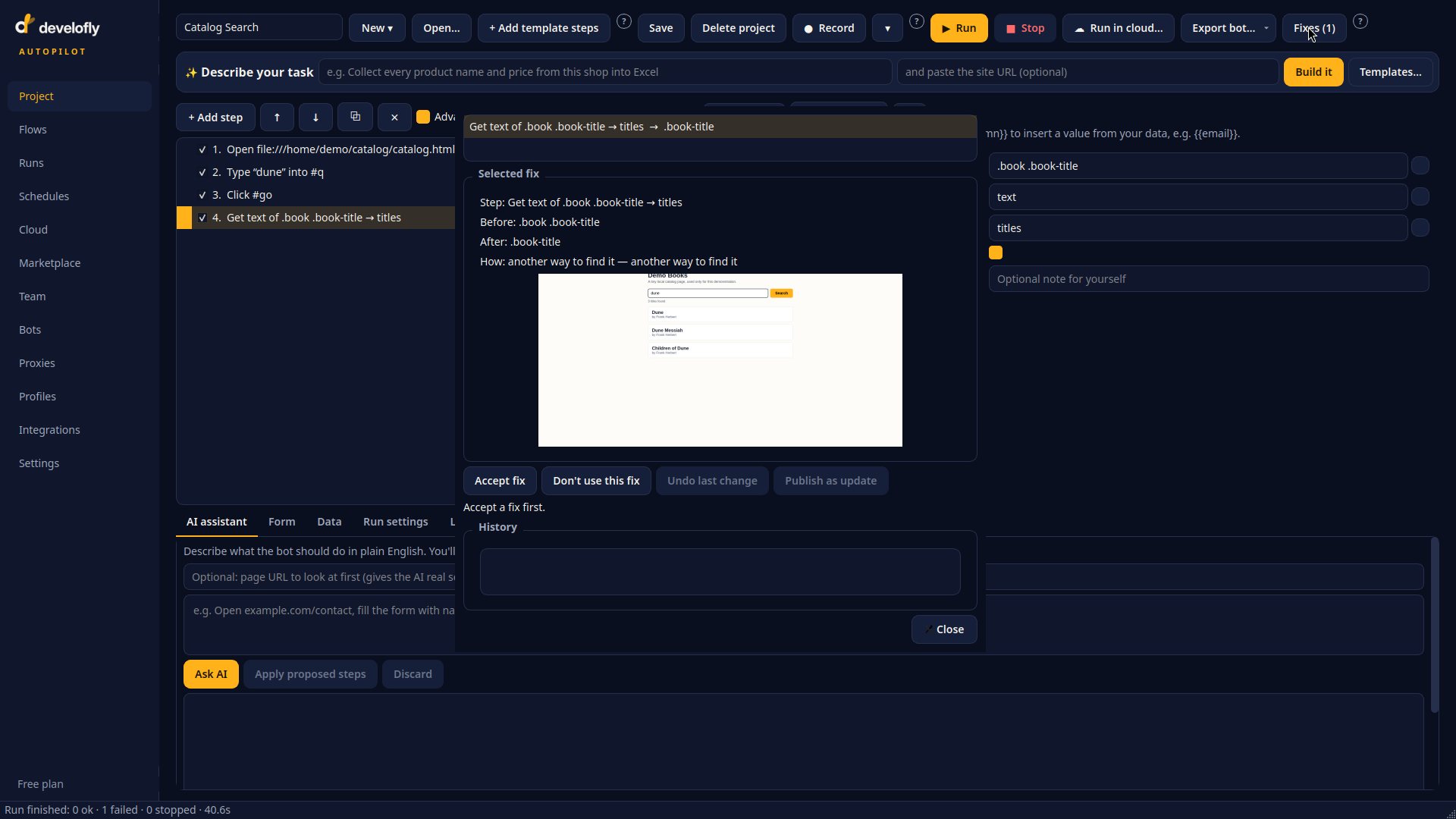
The Fixes dialog: a proposed selector change, with Accept and Undo.